The CJ3A Page CJ3B.info

Post reply

Warning: this topic has not been posted in for at least 120 days.
Unless you're sure you want to reply, please consider starting a new topic.

Note: this post will not display until it's been approved by a moderator.

Name:
Email:
Subject:
Message icon:

Verification:
Type the letters shown in the picture
Listen to the letters / Request another image

Type the letters shown in the picture:
Write the word between words Jeep from this JeepWILLYSJeep?:
How many slot has a GPW grill?  7 - 9 - 11:

shortcuts: hit alt+s to submit/post or alt+p to preview


Topic Summary

Posted by: mbullism
« on: September 15, 2019, 09:25:06 AM »


seems to work  :)
Posted by: athawk11
« on: September 13, 2019, 02:05:56 PM »

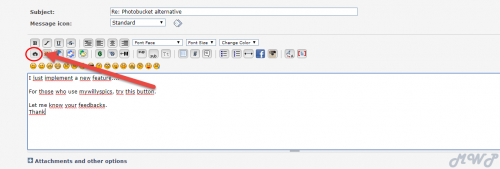
I just implement a new feature....

For those who use mywillyspics, try this button.


Let me know your feedbacks.
Thank

Love it!!!!  Thanks Pascal.  Showing the difference between the medium size and full size links...


Posted by: oldtime
« on: September 13, 2019, 11:04:52 AM »

Thanks imbullism, after playing around that helped.
 I found the BB imbed code that I was looking for.
I can now get "My Willys Pics" uploaded.


Below is a test of the paste image feature...
I obviously don't have a clue how to use it. Ha Ha Ha !

1217141341 00 zpse5883df5

Posted by: Rus Curtis
« on: September 13, 2019, 10:30:14 AM »

That will be convenient!  That image icon inserts the img/img brackets where you still need to paste the address.  Very much like what we were used to.  This will help with adding images automatically within a post vs. typing manually.  Thank you!
Posted by: Forum Master
« on: September 13, 2019, 10:05:15 AM »

I just implement a new feature....

For those who use mywillyspics, try this button.


Let me know your feedbacks.
Thank
Posted by: athawk11
« on: September 13, 2019, 08:20:16 AM »

I use it too.  It can be a little glitchy while using my iPad, but works fine with my desktop.  It doesn't offer too many flashy conveniences, but it gives us what most of us need; an easy way to embed a photo in our posts.
Posted by: mbullism
« on: September 13, 2019, 12:16:26 AM »


Also how does one link onto them for forum usage ?

From the album view select the pic and it will open a preview, click on the preview and down to the left will be two tabs.  Select the tab that says "embed codes"... I always go down to "medium image (linked)", hover the mouse over the BB code link and click the copy button that pops up... from there I just paste into whatever forum reply dialogue box i'm editing in.

Been using MWPs since very near the start with zero issues (Thanks, QJ!  :D )
Posted by: oldtime
« on: September 12, 2019, 03:31:25 PM »

After deleting some, I was able to remove my final 250 pics from Photobucket.
I transferred all of my older Photobucket pics onto a new account at " My Willys Pic s "
Thanks so very much for this addition.

At present I have a couple questions.
Can I put titles onto the individual pics ?

I started sorting through my picsby putting them in separate albums ..
Can the order of pics be sorted within each album ?

Also how does one link onto them for forum usage ?
Posted by: Forum Master
« on: September 09, 2019, 04:55:36 PM »

Whether you are using attachments pics or with the gallery, the same disk space will be used on the server.
They are both local to our website.
The only difference is that if you use the gallery then you can copy the code bbc. You can then insert images between text in your posts.

But the gallery has his own limitations and not so friendly user.
But it'a plan C.
Plan A would be to use a third party website like mywillyspics or photobucket or other.
And Plan B is the direct pics attachments.
Posted by: JeepFever
« on: September 09, 2019, 04:34:11 PM »

Don't the photos in attachments also use forum storage?    ie.  placing the photo in gallery,  and then linking to it,  would use no more storage than if an attachment?

I always try to keep the file size of my photos fairly small.   
Posted by: Rus Curtis
« on: September 09, 2019, 03:29:12 PM »

This is interesting.  Is there a storage limit?  Posting directly to the forum is easy but I like the idea of 3rd Party as it doesn't add to the forum storage.
Posted by: Forum Master
« on: September 09, 2019, 02:31:14 PM »

Our new forum also has a new feature: Gallery.

This could give our members another solution.

Here is my own example:


The only problem with this solution is that it uses the disk space of our own website.

The gallery give us three images linking codes:
Posted by: JeepFever
« on: September 09, 2019, 02:12:27 PM »

Thanks   . .    I will continue to use it.     

When there are a lot of photos to include,  it is nice to be able to insert photos into the body of the post,  rather than have them as attachments at the bottom of post.   I think the only way to get them up in the body text,  is to insert an "Img" link from an outside host. 

Thanks for providing that option.

 -Ron
Posted by: Forum Master
« on: September 09, 2019, 01:44:01 PM »

Well, i own the website. It is very low cost maintenance.
I don’t plan to shut it down. I don’t have any reasons to.

There is only around 30 users who post pics on it.


Quebec Jeep is me...aka Forum Master! Same guy!
Posted by: JeepFever
« on: September 09, 2019, 01:31:33 PM »

Is MyWillysPics.com  still a good place to keep photos, for posting here?   ie.   will it be around at least as long as the CJ3Apage?